Henny Swan
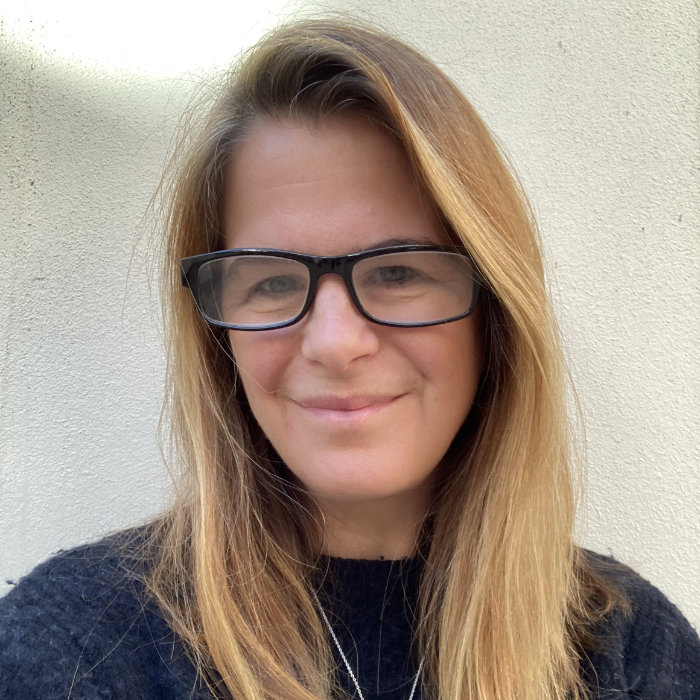
Henny is a Co-Founder and Director at TetraLogical. She specialises in embedded and sustainable accessibility, inclusive user experience, and design.
She began her career in the late 1990s working on dual-language web platforms in China, before moving into accessibility in the UK. She has since worked at the RNIB, Opera Software, TPGi, and the BBC, specialising in inclusive media and streaming experiences including iPlayer.
Henny is co-author of the Inclusive Design Principles and the the lead author of the BBC Mobile Accessibility Guidelines, and was co-lead of the International Liaison Group, part of the Web Standards Project (WaSP). She has contributed to standards and working groups within the World Wide Web Consortium (W3C) and is a regular international speaker, presenting at events including CSUN, SXSW, and Accessibility Toronto. In 2022 Henny graduated the Goldman Sachs 10,000 Small Businesses.
Posts by Henny Swan
Financial Conduct Authority guidance on supporting vulnerable people
If you work in financial services, you may be familiar with the UK Financial Conduct Authority's (FCA) FG21/1 Guidance for Vulnerable Customers which outlines what organisations should do to support vulnerable customers.
While targeted at FCA-regulated services, it's a useful set of guidelines for all organisations to keep in mind when supporting vulnerable customers, some of whom may also be disabled.
Sustainable accessibility in complex organisations: strategic foundations
Whether at the start of your accessibility journey or partway through it, complex organisations often face strategic, organisational, and external barriers that can make scaling accessibility difficult.
These challenges are common, but with the right foundations and committed leadership, accessibility can scale in ways that are both effective and sustainable.
Sustainable accessibility in complex organisations: organisational realities
Whether at the start of your accessibility journey or partway through it, complex organisations often face strategic, organisational, and external barriers that can make scaling accessibility difficult.
These challenges are common, but with the right culture, good communication, planning, and collaboration between teams, accessibility can scale in ways that are both effective and sustainable.
Sustainable accessibility in complex organisations: external factors
Whether at the start of your accessibility journey or partway through it, complex organisations often face strategic, organisational, and external barriers that can make scaling accessibility difficult.
These challenges are common, but by anticipating changes in the accessibility landscape and wider economic environment, you can make progress that is both effective and sustainable.
Guide to the Inclusive Design Principles
The Inclusive Design Principles (IDP) were first published in 2016 by myself, Ian Pouncey, Léonie Watson, and Heydon Pickering. We felt that while the Web Content Accessibility Guidelines (WCAG) set out what to do to meet technical compliance, many design decisions fall outside the scope of WCAG but still determine whether an interface is inclusive, usable, and welcoming.
The principles were developed to plug that gap with people-centred guidance that helps teams make better design decisions without adding unnecessary complexity. In this post, we'll look at who the principles are for, what they can be applied to, how they help people, and how you can integrate them into your own practices.
Understanding EN 17161 Design for All
While EN 301 549 is the technical standard cited in the European Accessibility Act (EAA), EN 17161 Design for All is a framework that supports embedding accessibility into strategy, design, and development processes.
Both are harmonised standards used by the EAA and yet all the focus has been on EN 301 549. This post explores how the two standards relate to each other, and what that means for providers of digital products and services.
Meet Josh: a sportsman who has spinal muscular atrophy
Meet Josh, a sportsman who has spinal muscular atrophy. Between training for the Paralympics and his busy day job, Josh talks to us about how navigating the web is constantly evolving, how he adapts to various assistive technologies, and his hopes and concerns for artificial intelligence (AI).
Meet Jonathan: a photographer who has ADHD
Meet Jonathan, the photographer behind the portraits of all our models (links to their interviews below) for the TetraLogical website.
Jonathan has ADHD (Attention Deficit Hyperactivity Disorder) and shares his experience browsing the web, including how distractions like cookies, pop-ups, and social media affect him.
Meet Andre: a music producer and blind screen reader user
Meet Andre, a music producer and blind screen reader user who is not afraid to take his custom elsewhere if your site is not accessible.
Andre shares his experience using the web including his love of headings and consistent design to help him navigate, and his dislike of accessibility overlays and poorly implemented page updates using live regions.
Meet Lauren: a film editor who has ADHD
Meet Lauren, a film editor moving into the world of producing and production management who has ADHD (Attention Deficit Hyperactivity Disorder).
Lauren shares what helps her stay focused when browsing the web and why white backgrounds and autoplaying video are not helpful for her.
Meet Steve: a photographer who is deaf and low vision
Meet Steve, a photographer from London who is deaf and low vision. He is an ex-civil servant who then went on to do freelance technology journalism and travelled the world.
Steve shares his experience of the web including increasing font size and using good colour contrast as well as the joys of using his Bluetooth hearing aids.
Meet Hasmukh: a blind cricketer and screen reader user
Meet Hasmukh, a talented blind cricketer with lots of patience and determination.
Hasmukh shares his experience using the web with a screen reader and highlights the importance of accessible emails, forms, language, and prioritising content within a web page.
Accessibility foundations
Our foundations series provides an overview of core accessibility considerations.
They are a good starting point for visual designers, content designers, interaction designers, and developers when designing and building accessible products and services.
The only accessibility specialist in the room
It's hard being the only one in your organisation or team responsible for accessibility. If that sounds familiar, I salute you, and this one's for you.
Foundations: accessible names and descriptions
An element's name, or accessible name, is how it's identified. An accessible description provides additional information, about the element, that complements the accessible name.
In this post we explore assigning accessible names and descriptions using HTML and WAI-ARIA.
Adding sign language to videos
As part of our ongoing effort to meet the Web Content accessibility Guidelines (WCAG) 2.1 and 2.2 Level AAA, we've created British Sign Language (BSL) versions of our video and created BSL playlists in our TetraLogical YouTube channel.
In this post we explore our process for adding BSL to videos and share some tips.
Foundations: introduction to WAI-ARIA
The Web Accessibility Initiative Accessible Rich Internet Applications specification 1.2, or WAI-ARIA or ARIA for short, is a technical specification written by the World Wide Web Consortium (W3C).
In this post we explore what WAI-ARIA is, and how it can enhance the user experience for people using screen readers.
Foundations: HTML semantics
HTML semantics provide accessibility information about page structure and an element's role, name, and state, helping to convey the nature and purpose of content on web pages.
In this post we explore what HTML semantics are, and how they're experienced by people using assistive technologies like screen readers and speech recognition software.
Research insight: accessibility of images
When conducting usability testing with disabled users, we observed how well images performed from both a visual and non-visual perspective when it came to finding and understanding content.
Accessible design systems
A design system is a library of styles, components, and patterns used by product teams to consistently and efficiently launch new pages and features. A good system has accessibility embedded throughout and includes documentation, guidelines and implementation notes for accessibility.
Foundations: headings
Well structured content helps everybody understand and navigate documents. When coded properly in the HTML, headings, lists, and landmarks help people who use screen readers (software that reads what’s on screen) both scan and navigate pages.
Foundations: colour and meaning
Colour is a valuable tool for communicating meaning. But if you can't see colour, then meaning is lost. Always plan to use colour to convey meaning in combination with another means of identification.
Foundations: colour contrast
Good contrast is about using colours that provide enough variation between the content and background. This is particularly important for people who have conditions that affect vision or colour perception, as well as people browsing on mobile in different light conditions.
Foundations: text descriptions
Text descriptions are primary content, and when images do not have a text description, anyone who cannot see the image will not know its purpose. This means people may be unable to access content or perform related tasks.
Browsing with assistive technology videos
Understanding how people with disabilities browse the web using assistive technologies (AT) is core to making an accessible and inclusive user experience. Our browsing with assistive technology videos series introduces commonly used software, who uses it, how it works, and ways people navigate content.
Browsing with speech recognition
In our fifth and final post from our browsing with assistive technology series, we discuss browsing with speech recognition.
You can also explore browsing with a desktop screen reader, browsing with a mobile screen reader, browsing with a keyboard, and browsing with screen magnification.
Browsing with screen magnification
In our fourth post from our browsing with assistive technology series, we discuss browsing with screen magnification.
You can also explore browsing with a desktop screen reader, browsing with a mobile screen reader, browsing with a keyboard, and browsing with speech recognition.
Browsing with a keyboard
In our third post from our browsing with assistive technology series, we discuss browsing with a keyboard.
You can also explore browsing with a desktop screen reader, browsing with a mobile screen reader, browsing with screen magnification and browsing with speech recognition.
Browsing with a mobile screen reader
In our second post from our browsing with assistive technology series, we discuss mobile screen readers.
You can also explore browsing with desktop screen readers, browsing with a keyboard, browsing with screen magnification and browsing with speech recognition.
Browsing with a desktop screen reader
In our first post from our browsing with assistive technologies series, we discuss desktop screen readers.
You can also explore browsing with a mobile screen reader, browsing with a keyboard, browsing with screen magnification and browsing with speech recognition.